When entries start coming in, they appear on your home dashboard as pending approval. Nothing reaches your judges until you’ve approved it.
Approving an entry
- Go to the Entries management tab.
- Set the filter to submitted to see everything waiting on a decision.
- Click View to read the entry.
- Click Edit to change its status.
- Change it from submitted to approved.
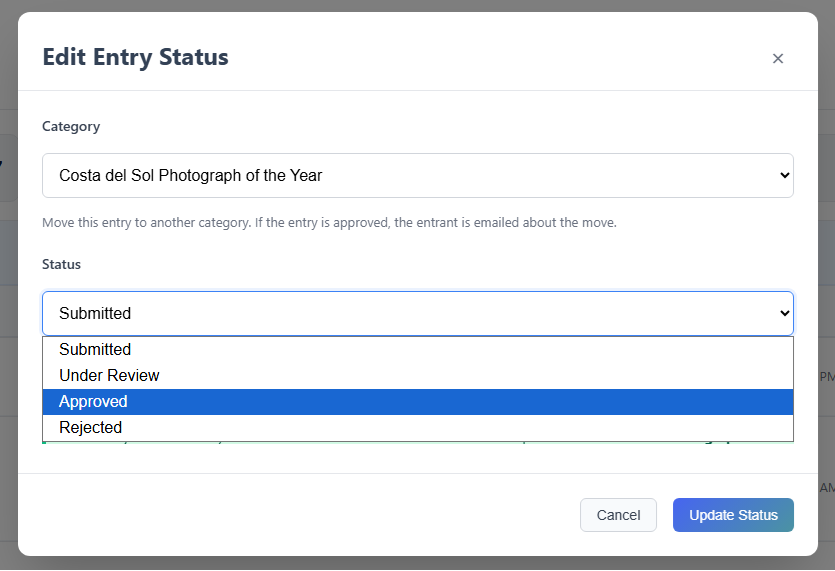
That’s it. The entry now appears in the judge panel, and the entrant receives an email confirming it’s been approved.
The four statuses
| Status | What it means | Entrant emailed? |
|---|---|---|
| Submitted | Waiting for you to review it | — |
| Under review | Set aside for another look. Not visible to judges or voters | No |
| Approved | Live in the judge panel, or open to your public vote | Yes |
| Rejected | Goes no further, but stays on record | No |
You can change a status at any time, so nothing you decide here is permanent.
Questions you might have
An entry is locked and I can’t change its status
The entrant hasn’t verified their email address yet. You can read the entry, but you can’t approve or reject it until they click the link in their verification email.
Click resend email to send it again, which usually does the job, or if their address looks wrong, contact them directly.
Does approving mean they’ve been shortlisted?
No. Approval only confirms the entry is eligible to go into judging (or public voting if you selected this option).
What am I actually checking before I approve?
Whether the entrant meets your eligibility requirements, whether they’ve picked the right category, whether the required questions have been answered, and whether the supporting evidence is appropriate.
What if they’ve entered the wrong category?
Transfer the entry from Entries management and it carries on in the right place. If it had already been scored, those scores are excluded automatically, so it arrives ready to be judged afresh.
Does rejecting an entry email the entrant?
No. Rejecting an entry doesn’t notify anybody, so if you want somebody told they’ve been ruled ineligible, you’ll need to contact them yourself.
Can I un-approve something?
Yes. Change the status to “under review” and it comes off the judge panel immediately, with no email to the entrant.
One thing to know: if you later approve it again, they receive a second approval email. They have no way of knowing anything happened in between, so a short note from you may make more sense of it.
Can I delete an entry?
Yes. Deleting removes it from your admin panel and the judge panel entirely, and the entrant isn’t notified.
I have a lot of entries to get through
Keep the submitted filter on while you work. Each entry you action drops out of the list, so the next one is waiting. There’s also a search box, and an export if you want the whole lot in a spreadsheet.