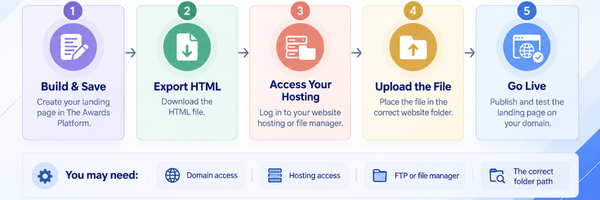
Your awards landing page can be published in one of two ways. The Awards Platform can host it for you, which needs no website hosting and no file uploads at all, or you can export it as an HTML file and put it on your own website.
This guide covers the second option.
On this page
- What you’ll need
- 1. Download your landing page
- 2. Decide on the web address
- 3. Get into your hosting
- 4. Create a folder
- 5. Upload the file
- 6. Test it
- 7. Keep it updated
What you’ll need
Four things, and if you already have a website you probably have the first three.
- A domain name or an existing website, such as
www.yourcompany.com - Website hosting that lets you upload HTML files
- Access to your hosting files, either through your provider’s File Manager or an FTPS or SFTP client
- Your exported landing page file from The Awards Platform
If any of that is unfamiliar, the person who built or maintains your website will know, and it’s worth asking them before you start rather than halfway through.
1. Download your landing page
Get your page finished before you export it, because every change you make afterwards means exporting and uploading again.
- Log in to The Awards Platform and select your program.
- Go to Landing Page Editor.
- Set up your content, categories, branding and display settings.
- Click Save.
- Select Export HTML.
The file downloads as index.html. Put it somewhere you’ll find it again.
2. Decide on the web address
Before uploading anything, decide what address you want people to visit, because it determines where the file goes.
A folder on your existing site
https://www.yourcompany.com/awards/
Usually the simplest route if you already have a website, since it needs nothing beyond creating a folder and uploading into it.
A dedicated subdomain
https://awards.yourcompany.com/
Gives your program its own address while keeping it tied to your organisation. It needs extra configuration through your hosting provider, including DNS and document-root settings, so allow more time.
3. Get into your hosting
There are two common ways to reach the place your website files live, and either works.
Your hosting File Manager
Most providers include one in their control panel.
Log in to your hosting account, open File Manager, and find your website’s public directory, usually named public_html, httpdocs or www.
FTPS or SFTP
If your provider offers it, use a client such as FileZilla.
You’ll need the server address, your username, a password or SSH key, and the port and protocol, all of which come from your hosting provider. Once connected, find the same public directory.
4. Create a folder
For a page at https://www.yourcompany.com/awards/, create a folder called awards inside your public directory. Your structure then looks something like this:
public_html/
    index.php
    about/
    contact/
    awards/
        index.html
The index.html inside that folder is your exported landing page.
5. Upload the file
- Open the
awardsfolder you’ve just created. - Upload
index.html. - Wait for the transfer to finish.
- Check the file is showing in the right folder.
Your page should now be live at https://www.yourcompany.com/awards/, though the exact address depends on your domain and how your hosting is configured.
6. Test it
Open the new address in a browser and work through this before you share the link with anybody.
- The page loads
- Images, logos and category visuals all appear
- Navigation and any interactive sections work
- Entry buttons and forms open correctly
- It displays properly on a phone as well as a desktop
- The address shows a valid HTTPS connection
- Nothing else on your website has been affected
Test from a device that isn’t the one you uploaded from, since your own browser may be showing a cached version.
7. Keep it updated
Whenever you make a change:
- Update your landing page in The Awards Platform and save it.
- Download a fresh HTML export.
- Go back into your File Manager or SFTP client.
- Replace the existing
index.htmlin your awards folder with the new file. - Refresh your website and confirm the change has appeared.
It’s worth building this into your routine around any date change, since a stale deadline on a public page causes more problems than almost anything else on this list.
Need a hand?
If you’re not sure how to reach your hosting or where the file should go, your website administrator or hosting provider will be able to point you to the right place in a couple of minutes.
For anything about exporting the page itself, email hello@theawardsplatform.com.